Giveaways
Giveaways that reward your most active members
Set the prize, the end date and who can enter, with required roles and a minimum number of messages, then give bonus entries to the roles you pick. Invite Tracker posts the giveaway, checks every entry and announces the winners when it ends.
Free to use, and already running in over 2 million servers.

Nitro Basic
- Hosted by @Kira
- Ends: ()
- Winners: 3
- Participants: 436
Requirements:
- Messages required: 100
- Roles required (any): @Verified
Roles with bonus entries:
- @Booster • 10 bonus entries
Only you can see this
You're in with 11 entries, thanks to @Booster. Good luck!
What it does
Entry requirements
Require certain roles, all of them or just one, and a minimum number of messages sent. Members who don't qualify can't enter.
Bonus entries by role
Give Server Boosters or any other role extra entries, up to 1000 per role, so the members you value have a better chance to win.
Blacklisted and bypass roles
Members with a blacklisted role can't enter any giveaway. Members with a bypass role can enter without meeting the requirements.
Scheduled giveaways
Pick a start date and a duration, or repeat a giveaway on a schedule, like every Monday at 10:00. It starts on its own.
Reroll ended giveaways
Draw new winners for an ended giveaway from the dashboard or with a command, and choose how many winners to draw.
Edit running giveaways
Change the prize, the end date, the requirements or the bonus entries of a running giveaway. Invite Tracker updates its message.
How it works
- 1
Add Invite Tracker
Add the bot to your server and open the Giveaways page of the dashboard, or use the /giveaway create command in Discord.
- 2
Set the prize and rules
Choose the prize, the number of winners, the channel and the end date, then add requirements and bonus entries roles if you want them.
- 3
Members enter, the bot draws
Members click Entry under the giveaway message. When it ends, Invite Tracker checks the requirements again and announces the winners.
Only the members you want can enter
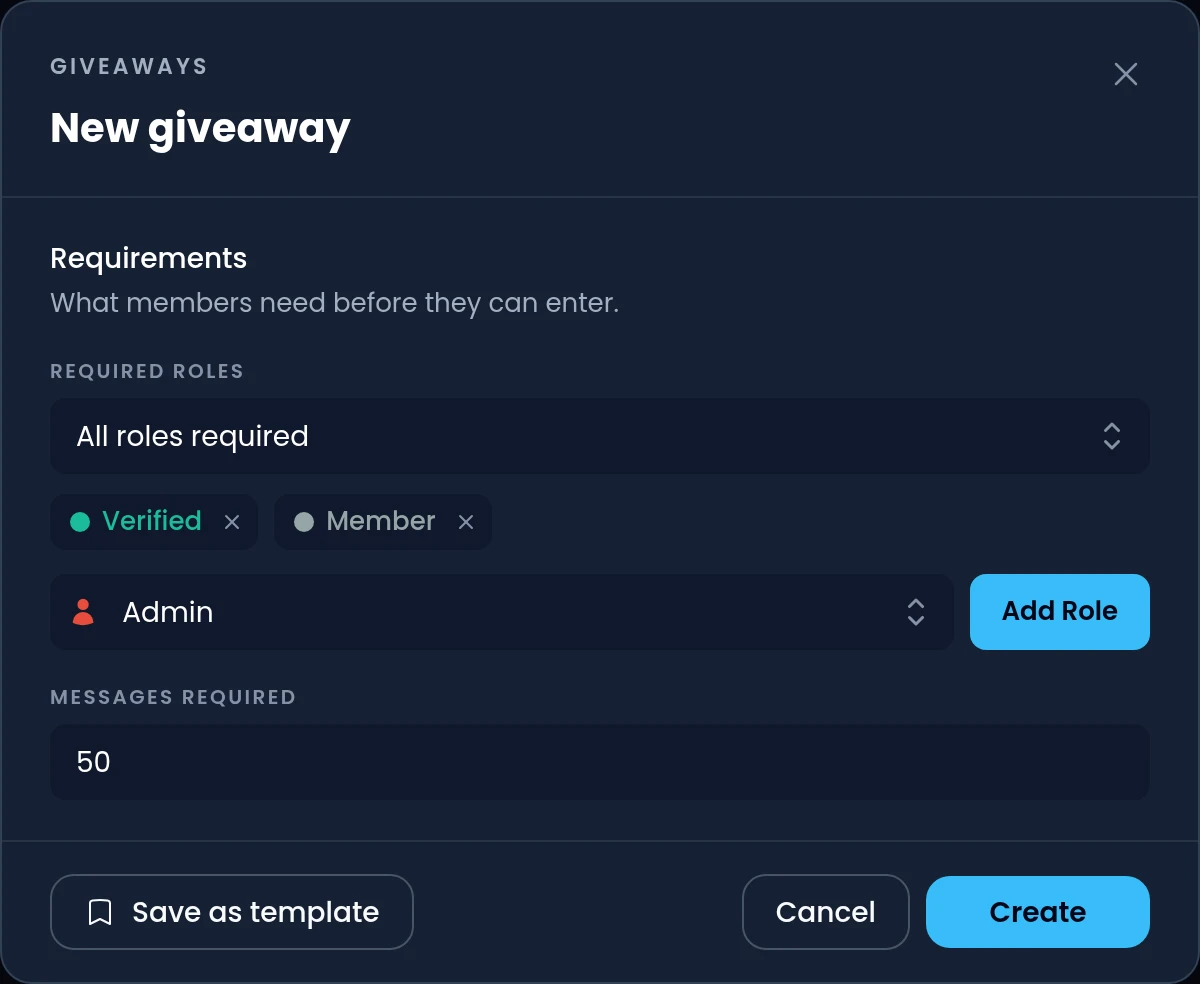
Requirements keep your giveaways for the members who take part in your server. Members who don't meet them are told why when they click Entry, and Invite Tracker checks again when the giveaway ends.
- Up to 10 required roles per giveaway, with all of them or only one of them needed
- A minimum number of messages sent, from the counts kept by Invite Tracker's message counting
- Blacklisted roles keep members out of every giveaway, bypass roles skip the requirements
- Members who left or lost a required role by the end can't win
Bonus entries for the members you value
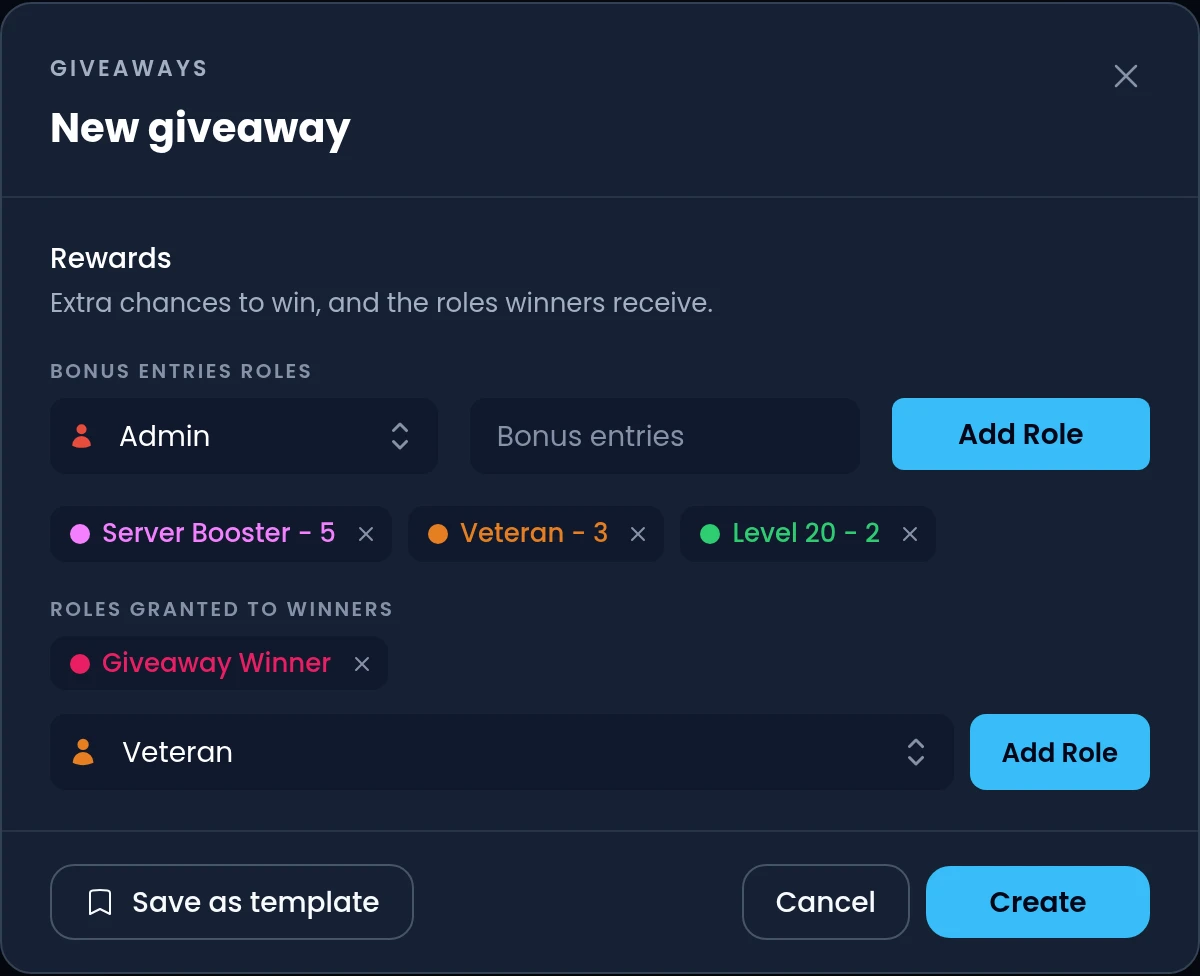
Give Server Boosters, long-time members or any other role extra chances to win. Each role adds its bonus entries to the member's base entry, and the draw is weighted by the total.
- Up to 1000 bonus entries per role, and the entries of several roles add up
- Up to 10 bonus entries roles per giveaway, or 30 with Premium
- Members see their entries, role by role, as soon as they enter
- A Participants button under the giveaway lists everyone who entered
Giveaways that start on their own
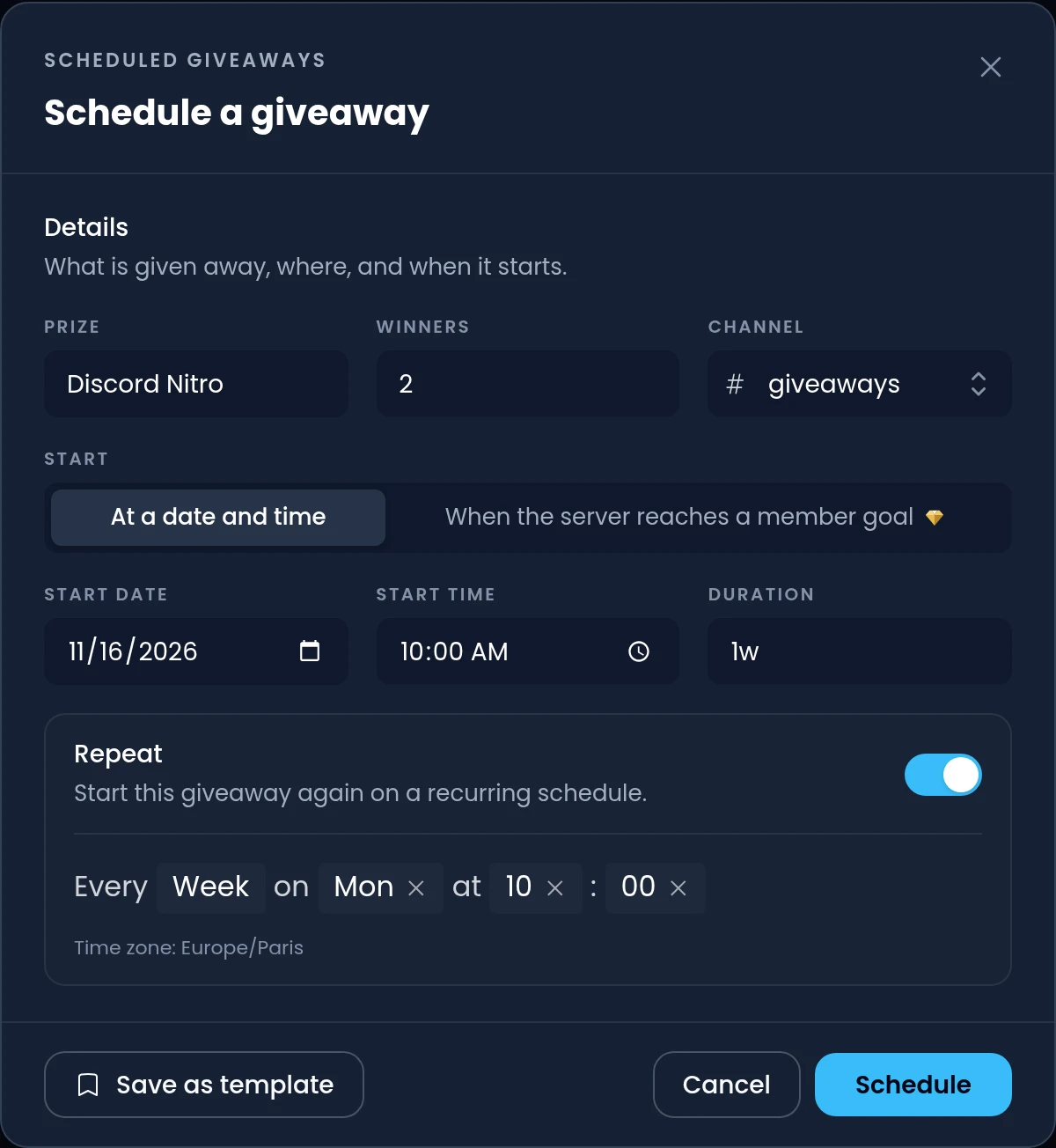
Schedule a giveaway with a start date and a duration, and Invite Tracker posts it at that time. Turn on Repeat to run it again every day, week or month.
- Repeat a giveaway on a schedule, like every Monday at 10:00
- With Premium, start a giveaway when your server reaches a member goal
- Templates fill in the prize, requirements and rewards for you
- If a giveaway can't start, a warning tells you why and a Retry button starts it again
Commands
/giveaway create <prize> <duration> <winners> <channel>Starts a giveaway, with optional role and message requirements and bonus entries roles./giveaway end <message_id>Ends a running giveaway now and draws its winners right away./giveaway reroll <message_id> [winner_amount]Draws new winners for an ended giveaway, as many as it ended with unless you choose./giveaway delete <message_id>Deletes a running giveaway and its message without drawing any winners./giveaway listLists the server's running giveaways with their message IDs./giveaway scheduledLists the server's scheduled giveaways and when each one starts.
Free and Premium
Free
- Up to 5 running giveaways at once, with up to 20 winners each
- Giveaways that last up to 31 days
- Required roles, messages required and up to 10 bonus entries roles
- 1 scheduled giveaway, which can repeat, and 1 template
- Rerolls for your 10 most recently ended giveaways
Premium adds
- Up to 50 running giveaways, 100 winners each and 3 months long
- Edit running giveaways from the dashboard
- No vote buttons and no vote extra entry on your giveaways
- Unlimited scheduled giveaways and templates, 50 ended kept for rerolls
- Winner roles, images, winner tiers, minimum entrants and member goals
Frequently asked questions
Can I require roles or messages to enter a giveaway?
Yes. A giveaway can require up to 10 roles, either all of them or only one, and a minimum number of messages sent in your server. Members who don't meet them can't enter, and Invite Tracker checks them again when the giveaway ends.
Can I require invites to enter a giveaway?
Not as a giveaway requirement: the requirements are required roles and a number of messages sent. To reward the members who invite the most, run an invite event with Premium. It counts your members' invites from its start and announces the winners when it ends.
How do bonus entries work?
Every member who enters has 1 base entry. Each bonus entries role they have adds its bonus entries, up to 1000 per role, and the winners are drawn at random, weighted by each member's total. Members see their entries when they enter.
Why do my giveaways have a Vote for 1 Extra Entry button?
On free servers, members who voted for Invite Tracker on Top.gg in the last 12 hours get 1 extra entry, and giveaways show a button to vote. On a Premium server, giveaways and winner announcements show no vote buttons, and voting gives no extra entry.
How do I reroll a giveaway?
Click the reroll button next to the giveaway under Ended Giveaways on the dashboard, or use /giveaway reroll with its message ID, and choose how many winners to draw. Free servers keep their 10 most recently ended giveaways for rerolls, Premium servers 50.
Can I edit a giveaway after it started?
With Premium, yes: click the Pencil button next to a running giveaway on the dashboard and change anything but the channel, such as the prize, the end date or the requirements. Invite Tracker updates the giveaway message. Without Premium, a running giveaway can be ended or deleted but not edited.
Related features
Message counting
Count every member's messages, keep spam out of the count and give reward roles at message milestones.
Invite tracking
See who invited your new members, catch fake invites and find out which invite links bring people in.
Events
Time-boxed invite and message competitions with their own leaderboard, scheduled starts and winners.
Discover Premium Perks
Why settle for the basics? Premium gets you 25 ticket panels, 50 giveaways at once, unlimited analytics history and fully custom welcome banners, from €4.99 a month.