Leaderboards
See who grows your server and who keeps it talking
Invite Tracker ranks your members by the invites they bring and the messages they send, all time or over the last day, week or month. Check the ranks with /leaderboard, pin them in a channel or share them on the web.
Free to use, and already running in over 2 million servers.
Rex
167 invites
Kira
214 invites
Théo
98 invites

Invite Tracker APP
Monthly Invites Leaderboard
- 1.@Kira • 214 invites. (205 regular, 11 left, 4 fake, 24 bonus)
- 2.@Rex • 167 invites. (171 regular, 9 left, 2 fake, 7 bonus)
- 3.@Théo • 98 invites. (104 regular, 6 left, 0 fake, 0 bonus)
- 4.@Juno • 86 invites. (72 regular, 6 left, 0 fake, 20 bonus)
- 5.@Ivy • 52 invites. (71 regular, 17 left, 2 fake, 0 bonus)
Invite Tracker • Page 1 • Today at 11:39 AM
What it does
Invite leaderboard
/leaderboard invites ranks members by their invites, with the regular, left, fake and bonus counts next to each name.
Message leaderboard
/leaderboard messages ranks your most active members. It follows your message counting rules, so the delay and blacklists keep spam off it.
Daily, weekly or all time
Pick a period with the type option: all time, the last 24 hours or the last 7 days. Premium adds a monthly leaderboard of the last 30 days.
Pinned leaderboards
Invite Tracker posts and pins the top 10 in the channels you pick, then updates the message every 15 minutes.
Public web leaderboard
Publish your top 50 at your own invite-tracker.com link. Anyone can open it in a browser, with no Discord login.
Hide members
Keep staff or test accounts off the invite leaderboard while they keep their invites. Hide 3 members for free, or 100 with Premium.
How it works
- 1
Add Invite Tracker
Add the bot to your server and it starts counting the invites and messages of your members right away.
- 2
Run /leaderboard
Any member can run /leaderboard invites or /leaderboard messages and go through the ranks 10 at a time with the buttons.
- 3
Pin it or publish it
With Premium, pick channels on the Pin Leaderboard page, or turn on Publish to the web on the Leaderboard page of your dashboard.
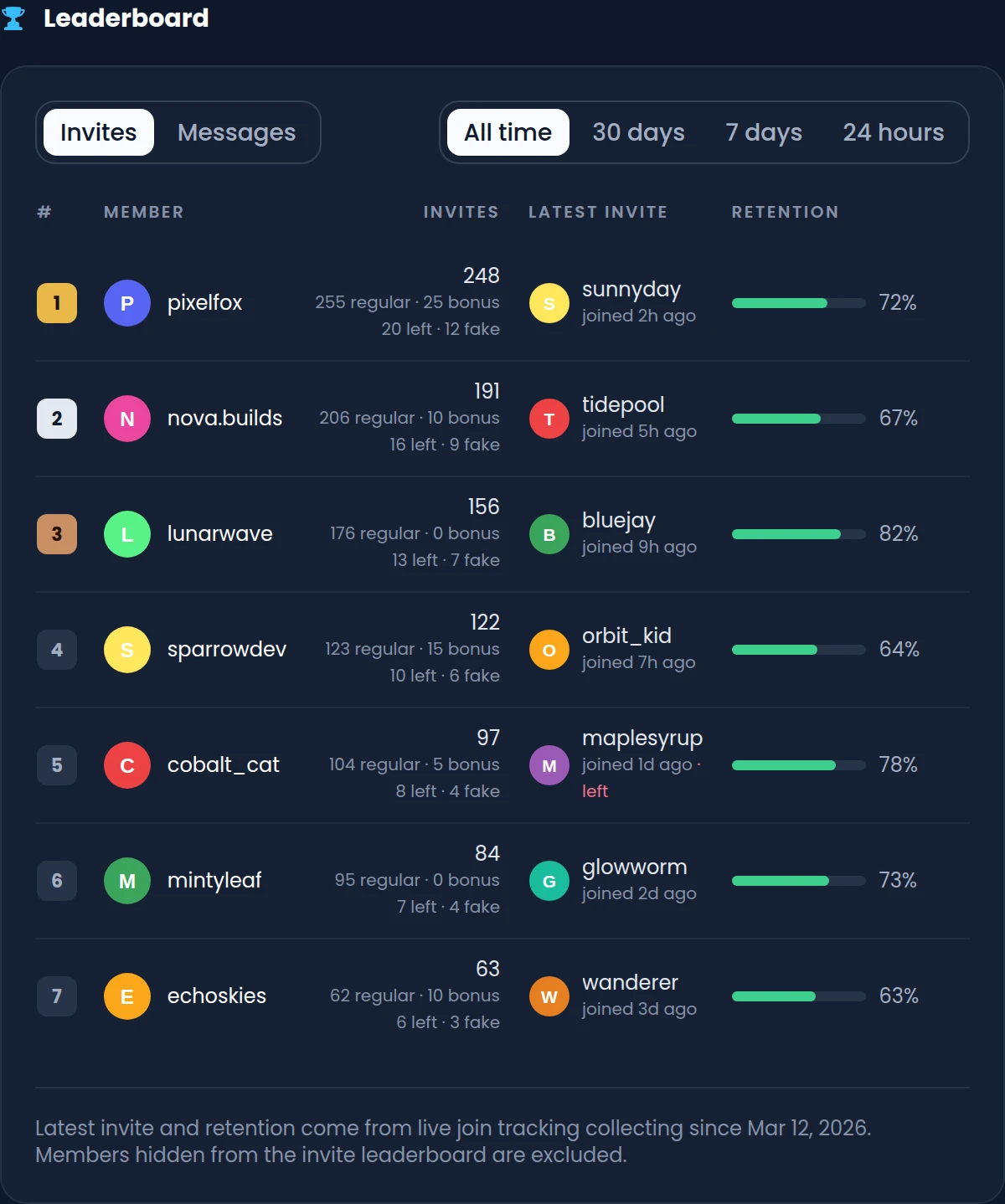
A live leaderboard in your dashboard
With Premium, the Leaderboard page of the dashboard ranks your top 50 members by invites or messages. For each inviter, it also shows who they invited last and how many of their invited members stayed.
- All time, 30 days, 7 days or 24 hours, one click apart
- Each total split into regular, bonus, left and fake invites
- The newest member each inviter brought in, when they joined and whether they left
- Retention: the share of their real invited members still on your server
Share your leaderboard on the web
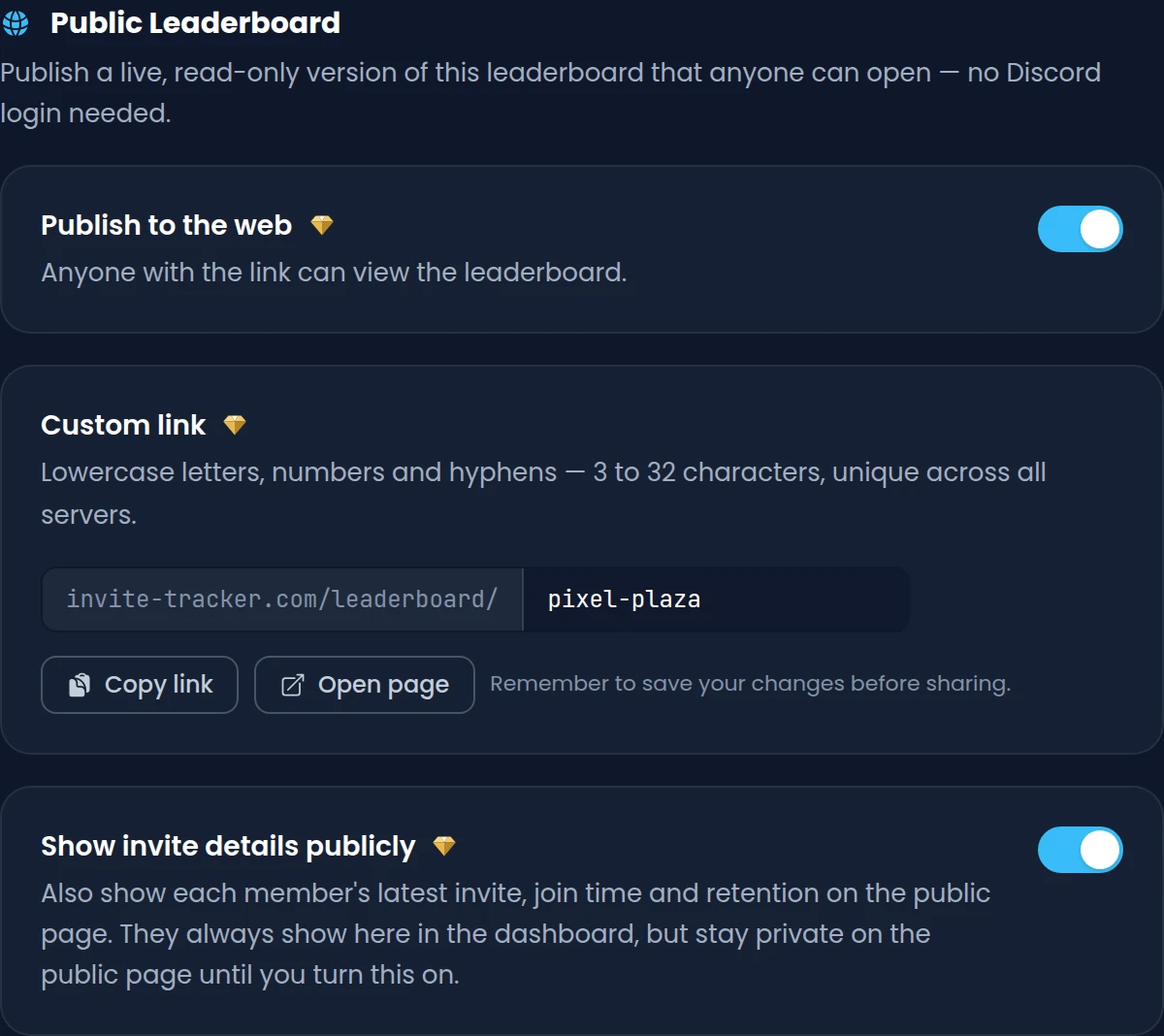
With Premium, publish a live, read-only copy of your leaderboard at invite-tracker.com/leaderboard/ followed by the link you choose. Members can check their rank from any browser without opening Discord.
- Your server's name, icon and member count above the invite and message rankings
- The top 50 over all time, 30 days, 7 days or 24 hours, with no login
- A custom link of 3 to 32 lowercase letters, numbers and hyphens
- Latest invites and retention stay private until you turn on Show invite details publicly
Reset the counts on a schedule
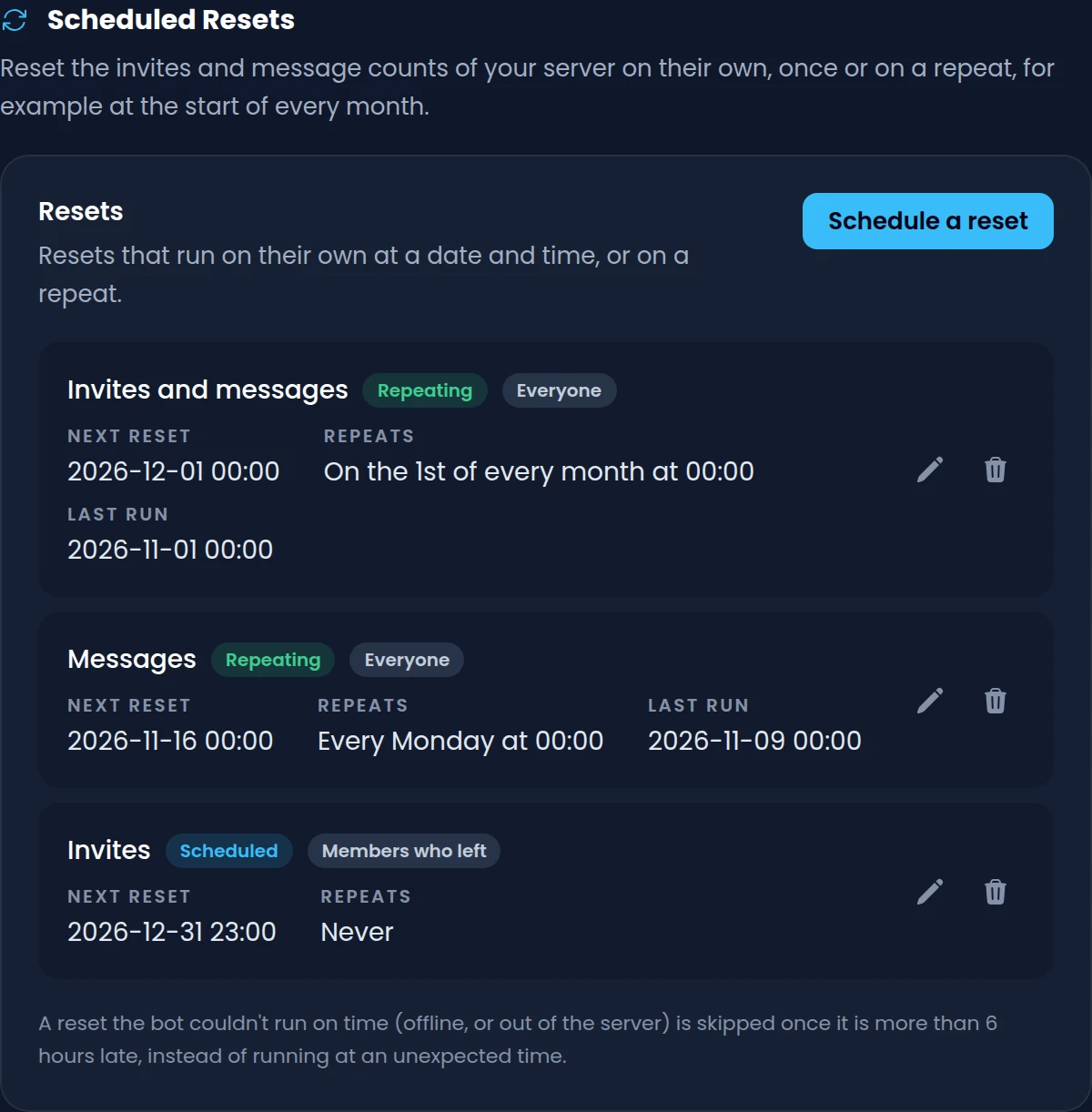
Running a monthly invite contest? With Premium, scheduled resets put the invite counts, the message counts or both back to zero for you, once at a date or on a repeat such as the 1st of every month.
- Reset everyone, or only the members who left your server
- Repeat every day, on chosen weekdays, days of the month or days of the year
- Up to 10 scheduled resets per server, each at most once an hour
- Free servers can reset by hand with /resetinvites and /resetmessages
Commands
/leaderboard invites [type] [role]Shows the top inviters, 10 per page, with their regular, left, fake and bonus invites./leaderboard messages [type] [role]Shows the members who sent the most counted messages, 10 per page./exportleaderboard <leaderboard_type>Exports the invite or message leaderboard as a .csv file for a spreadsheet. Premium/resetinvites [user] [target]Resets the invites of one member, of everyone, or of the members who left./resetmessages [user] [target]Resets the message count of one member, of everyone, or of the members who left.
Free and Premium
Free
- Invite and message leaderboards with /leaderboard
- All time, daily and weekly leaderboards
- Up to 3 members hidden from the invite leaderboard
- Resets by hand with /resetinvites and /resetmessages
Premium adds
- Monthly leaderboards and leaderboards for a single role
- Pinned leaderboards that update every 15 minutes
- The top 50 in your dashboard and on a public web page
- Up to 10 scheduled resets, once or on a repeat
- Up to 100 members hidden from the invite leaderboard
Frequently asked questions
How do I see who invited the most members to my Discord server?
Add Invite Tracker and run /leaderboard invites. It ranks members by their invites: regular and bonus invites, minus the invited members who left and the fake ones. Add the type option to see the last 24 hours or 7 days instead of all time.
Can a leaderboard update itself in a channel?
Yes, with Premium. On the Pin Leaderboard page, pick a channel for any of the all time, daily, weekly or monthly invite and message leaderboards. Invite Tracker sends and pins the top 10 there and edits the message every 15 minutes. It needs to send messages, embed links and pin messages in that channel.
Can I reset the leaderboard every month?
Yes. The daily, weekly and monthly leaderboards always cover the last 24 hours, 7 days or 30 days, so they move on their own. To put the counts back to zero on the 1st of every month, schedule a repeating reset with Premium, or run /resetinvites or /resetmessages with the all target. A reset can't be undone.
Can I hide someone from the invite leaderboard?
Yes. Add their user ID under Hidden from leaderboard in the Invite Tracking settings. They keep their invites but don't show up on /leaderboard invites, the pinned leaderboards or the dashboard and web leaderboards. Free servers can hide 3 members and Premium servers 100. The message leaderboard has no hidden list.
Can I share my server's leaderboard as a web page?
Yes, with Premium. Turn on Publish to the web on the dashboard's Leaderboard page and choose a link, such as invite-tracker.com/leaderboard/your-server. Anyone can open it without logging in and see the top 50 by invites or messages. The page stops being available if your Premium ends.
Can I show a leaderboard for one role only?
Yes, with Premium. Add the role option to /leaderboard invites or /leaderboard messages, and only members with that role are ranked. It works with every type, so you can rank one team or tier over the last week.
Related features
Invite tracking
See who invited your new members, catch fake invites and find out which invite links bring people in.
Message counting
Count every member's messages, keep spam out of the count and give reward roles at message milestones.
Events
Time-boxed invite and message competitions with their own leaderboard, scheduled starts and winners.
Discover Premium Perks
Why settle for the basics? Premium gets you 25 ticket panels, 50 giveaways at once, unlimited analytics history and fully custom welcome banners, from €4.99 a month.