Support tickets
Help every member in a private ticket channel
Members open a ticket from a panel in your server, and your staff answer them in a private channel. Add forms, claiming and web transcripts, then follow every ticket from the dashboard.
Free to use, and already running in over 2 million servers.
Support
Create a ticket using the button below.
Invite Tracker
 Invite Tracker
What do you need help with?
My invite count reset after I rejoined.
What it does
Buttons or a select menu
Post a panel with ticket buttons or one select menu. Each option opens a ticket from its own template, with its own category and support roles.
Questions before it opens
A Discord modal asks your questions before the ticket is created. The answers appear in the first message, so staff see the issue right away.
Claiming for your staff
A support member claims a ticket with one click so two moderators never answer the same member. You can let only the claimer unclaim it.
Web transcripts
When a ticket closes, Invite Tracker saves a transcript you read in the browser. Each template decides whether staff, the opener or both can open it.
Reminders and auto close
Send a reminder when nobody has replied for a while and close inactive tickets on their own, based on messages from the owner or your staff.
Escalation between teams
Move a ticket to another template when billing or senior staff should take over. The channel can change category, name and support roles.
How it works
- 1
Add Invite Tracker
Add the bot to your server and open Tickets in the dashboard. It needs permission to create channels and manage their permissions.
- 2
Create a template
Pick the category, the support roles and the first message. Turn on forms, claiming, transcripts or automations for this type of ticket.
- 3
Send a panel
Bind your templates to a panel, choose buttons or a select menu, then click Send Panel. Members can open tickets right away.
One panel, several kinds of tickets
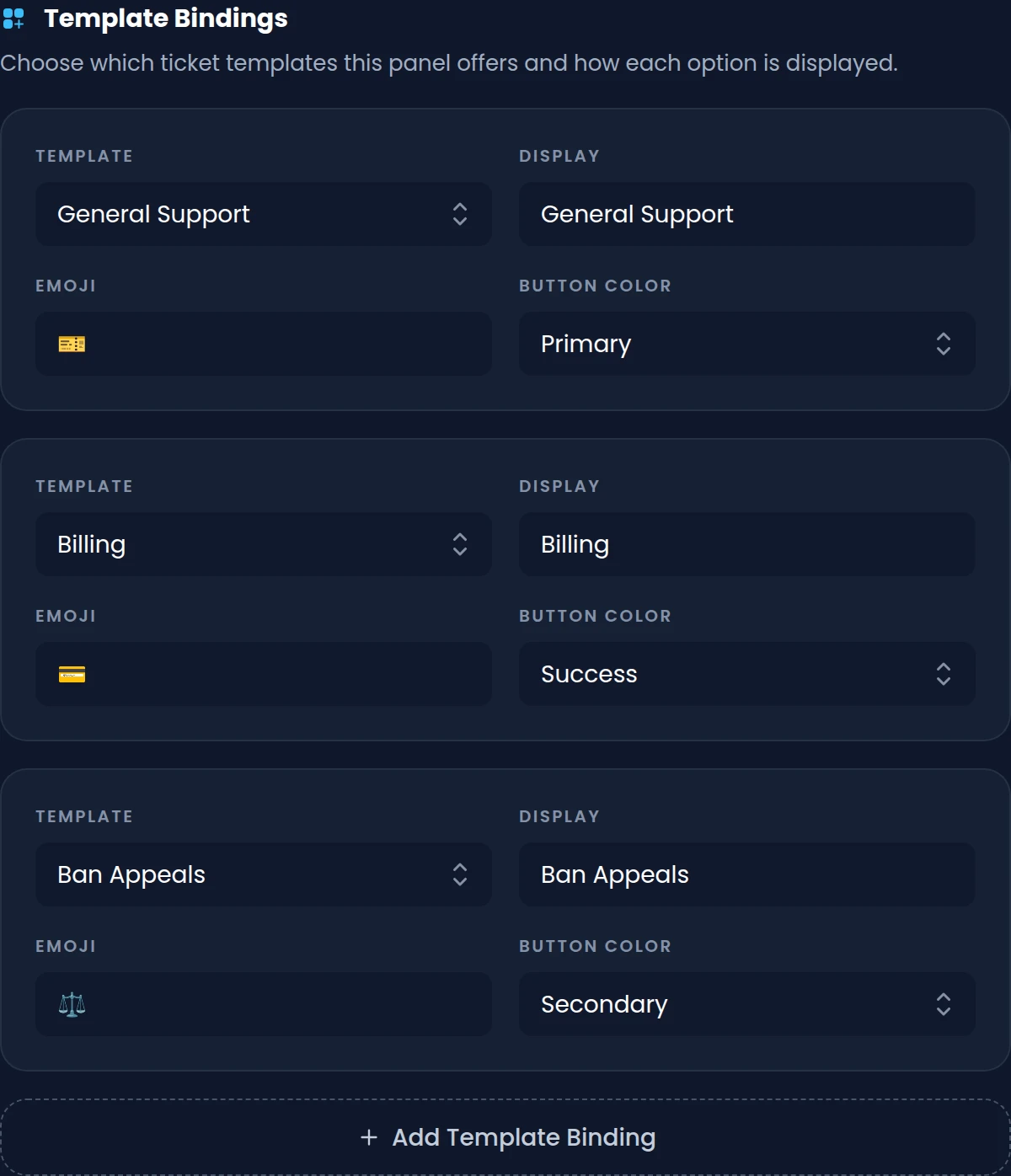
Each option on a panel opens a ticket from its own template. General support, billing and ban appeals can each get their own category, team and first message.
- Buttons with your own label, emoji and color, or one select menu with descriptions
- Forms with short or paragraph questions, each with a minimum and maximum length
- A limit on open tickets per member, with roles that can bypass it
- Overflow categories take new tickets once the main category reaches 50 channels
Find any ticket, open or closed
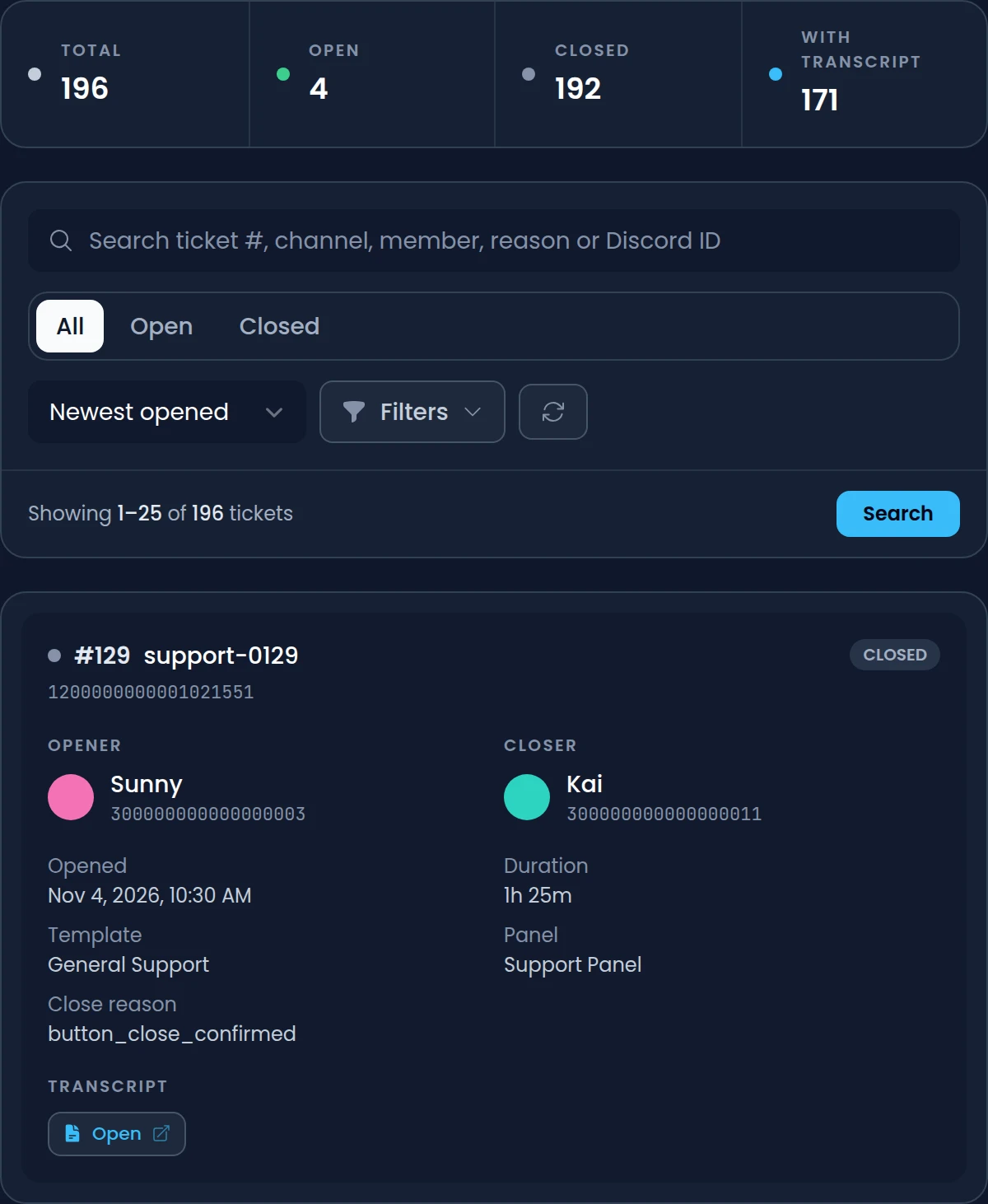
The History page lists every ticket your server has opened, with its opener, closer, template and panel. Open a saved transcript in one click and read the whole conversation in your browser.
- Search by ticket number, channel, member, close reason or Discord ID
- Filter by template, panel, transcript, opener, closer and date
- Transcript access for support roles, the ticket opener or both, after Discord sign-in
- A transcript channel that gets a summary and an Open transcript button for each ticket
See how your support team performs
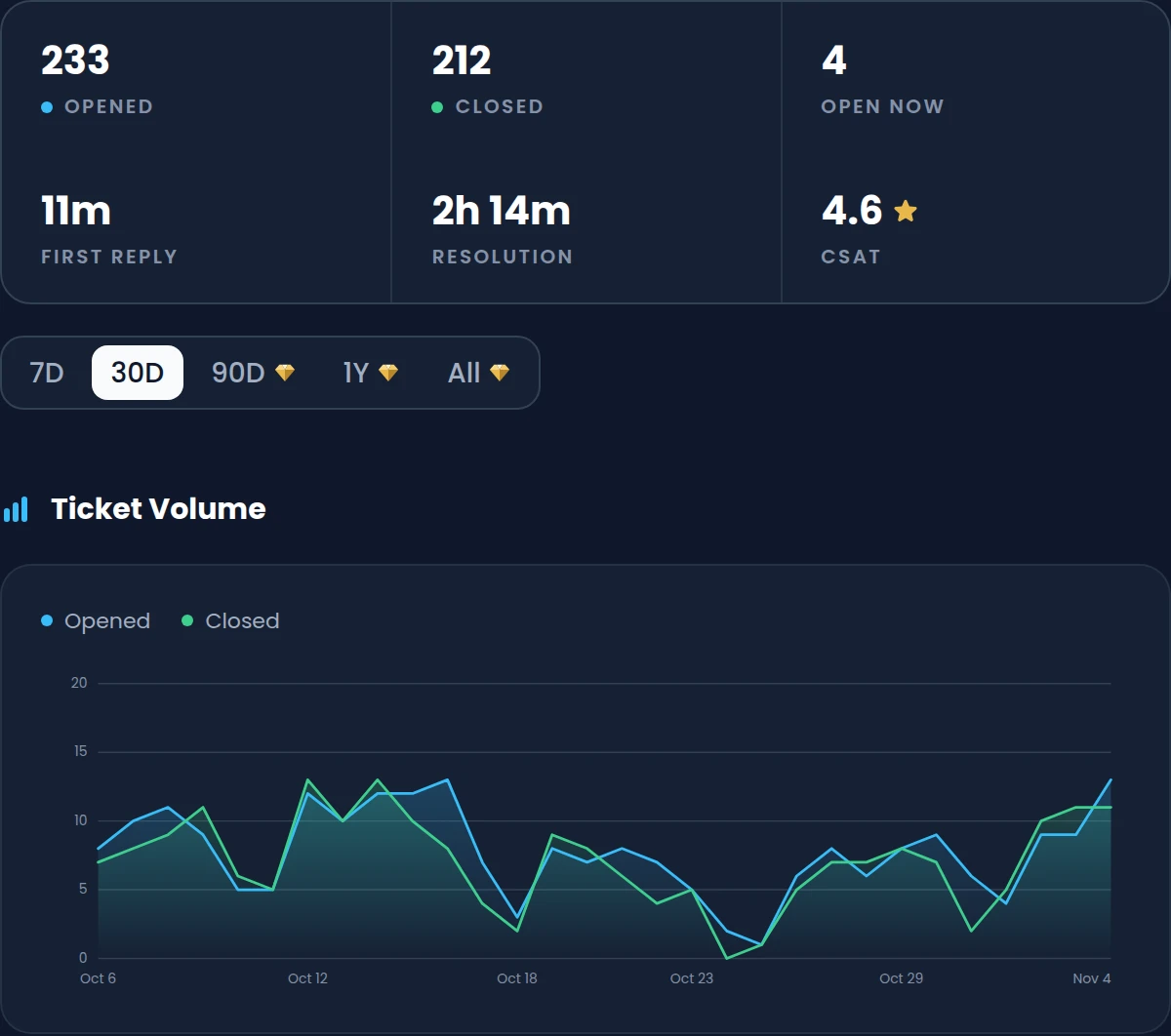
With Premium, Ticket Analytics turns your ticket history into numbers: how many tickets come in, how fast members get a first reply and how long tickets take to close. Satisfaction surveys add a 1 to 5 rating from members after their ticket closes.
- Median and average first reply and resolution times
- A staff leaderboard with tickets handled, claims, average time and CSAT
- Tickets opened and closed, and the average time, by template and by panel
- Ranges of 7, 30 or 90 days, one year or all time
Commands
/ticket-closeCloses the current ticket right away and saves its transcript when transcripts are on./ticket-claimClaims the current ticket so the rest of the team knows you're handling it./ticket-add-user <user>Gives another member access to the current ticket channel so they can read and reply./ticket-rename <name>Renames the current ticket channel, for example to note what the ticket is about./ticket-escalate <target> [reason]Moves the current ticket to another template, with an optional reason. Premium/ticket-automation <start|stop>Pauses or restarts the template's automations for the current ticket.
Free and Premium
Free
- 3 panels and 3 templates, with up to 3 options per panel
- Unlimited tickets, with claiming, logs and custom buttons
- Forms of up to 3 questions before a ticket opens
- Web transcripts, kept for 30 days
- 1 automation rule: close a ticket when its owner leaves
Premium adds
- 25 panels, 25 templates, 25 options per panel and forms of 5 questions
- 10 automation rules per template, with reminders and auto close
- Transcripts kept with no time limit, and sent by DM when a ticket closes
- Escalation, opening hours, advanced claiming and role changes
- Ticket analytics and satisfaction surveys with CSAT scores
Frequently asked questions
Is the Discord ticket bot free?
Yes. Tickets are free in every server, with unlimited tickets, forms, claiming, logs and web transcripts. Free servers get 3 panels and 3 templates and keep transcripts for 30 days. Premium raises those limits and adds automations, escalation and analytics.
How do ticket transcripts work?
Turn on Enable Transcript in a template, and Invite Tracker saves the ticket's messages and form answers when it closes. The transcript opens in the browser after signing in with Discord, for your support roles, the opener or both. Server administrators can always open it. A transcript holds up to the latest 5000 messages.
Can tickets close automatically when nobody replies?
Yes, with Premium. Add an automation rule with the Message Not Found trigger: when no message comes from the owner, your staff or anyone for the delay you set, Invite Tracker sends a reminder or closes the ticket. Free servers can use one rule that closes a ticket when its owner leaves the server.
Can different teams handle different kinds of tickets?
Yes. Each template has its own category and support roles, so billing tickets can go to your billing team and appeals to your moderators. With Premium, staff can move a ticket to another team's template with /ticket-escalate, even a template that isn't on any panel, such as a senior support team.
Can members answer questions before a ticket opens?
Yes. Turn on Enable Form in a template and members fill in a Discord modal before their ticket is created. Free servers can ask 3 questions and Premium servers 5. The answers can be shown in the first ticket message, so staff see the issue right away.
Can I stop tickets from opening outside support hours?
Yes, with Premium. Turn on opening hours for a panel, pick a timezone and add weekly windows. Outside those hours, members who use the panel get a private reply saying it's closed, while the roles you choose can still open tickets.
Related features
Welcome & leave messages
Join, leave and DM messages that name the inviter, with welcome banners you design in the dashboard.
Verification
New members click Verify and pass a button, captcha or hCaptcha check before they get access.
Invite tracking
See who invited your new members, catch fake invites and find out which invite links bring people in.
Discover Premium Perks
Why settle for the basics? Premium gets you 25 ticket panels, 50 giveaways at once, unlimited analytics history and fully custom welcome banners, from €4.99 a month.